How Google Shopping Ads Work and How to Set Them Up
In this informative blog, I am going to break down the essentials of Google Shopping Ads, explaining how they function, the underlying auction algorithm, and the step-by-step setup process necessary for e-commerce sellers to succeed with these ads. I will also tell you the importance of understanding the Google Shopping Ads ecosystem to maximize sales and profits through well-optimized campaigns.
What Are Google Shopping Ads?
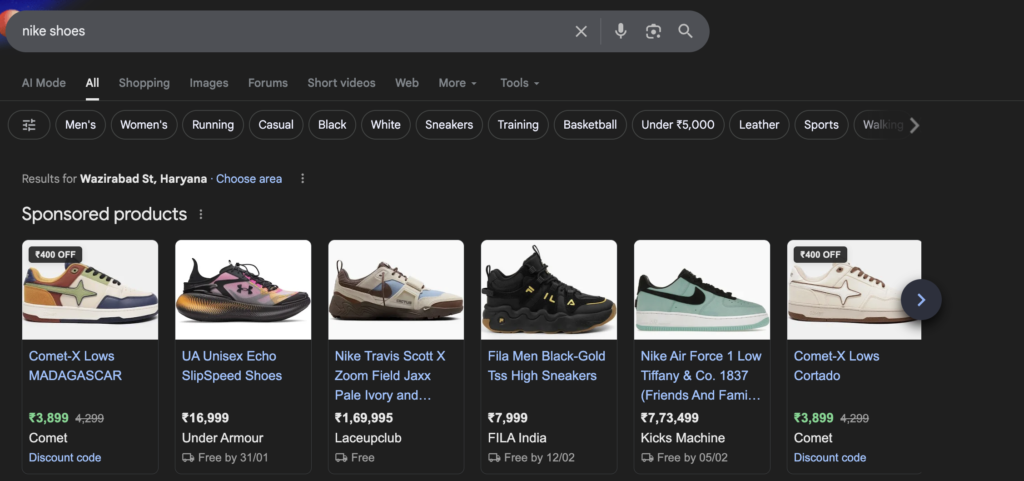
- Google Shopping Ads appear at the top of Google search results, distinct from traditional text ads.
- These ads display:
- Product name
- Price
- Product image
- Customer reviews (if available)
- When shoppers click on a Shopping Ad, they are taken directly to the store’s product page to make a purchase.
- Because users see product images and pricing upfront, shoppers generally have a clearer idea of what they want, which leads to higher conversion rates compared to other ad types.
How the Google Shopping Auction Works
- When a user searches on Google, the platform runs an auction to decide which ads to show and in what order.
- Eligibility to enter the auction depends on product relevance to the search query.
- Advertisers set a maximum bid (the highest cost-per-click they’re willing to pay).
- Google adjusts this bid based on:
- Product relevance to the search
- Historical shopper interactions with the product
- Past performance of the advertiser’s store (to a lesser extent)
- The auction determines ad position, where higher positions generate more traffic but cost more.
- Key insight: Google prioritizes ads that provide the best user experience by showing relevant ads to shoppers most likely to buy, rewarding advertisers with better positions and results.
Google Shopping Algorithm and Audience Targeting
- Google uses massive data analysis across billions of users to predict the best potential customers for your products—even before they start searching.
- For example, if your store sells organic food products popular with women aged 35 to 55 with high household incomes, Google will target ads to a similar audience.
- This predictive targeting benefits:
- Google, by increasing ad clicks and revenue.
- Shoppers, by showing relevant ads matching their interests.
- Advertisers, by driving more qualified traffic that converts better.
- Advertisers can refine audience targeting through various account and campaign settings, which enhances Google’s ability to show ads to the right people.
Four Essential Components to Set Up Google Shopping Ads
- E-commerce Website
- Must have an operational e-commerce store, ideally on platforms like Shopify or WooCommerce.
- Shopify is highly recommended for its ease of use and integration with Google Shopping.
- Product Feed
- A file containing comprehensive data about all the products you want to advertise.
- Includes product titles, descriptions, prices, images, and other relevant attributes.
- Setting up a good product feed is critical for campaign success.
- KeyCommerce offers free tutorials and courses on creating and optimizing product feeds.
- Google Merchant Center (GMC)
- The platform where you upload and verify your product feed.
- Acts as a “gatekeeper” ensuring product data meets Google’s standards.
- Manages product disapprovals or feed errors.
- Note: Google Merchant Center was previously known as Google Merchant Center Next.
- Google Ads Account
- Used to create and manage your Shopping campaigns.
- Connects with Google Merchant Center to pull product data for ads.
- Many store owners mistakenly think they need separate Google accounts for Ads and Merchant Center, but these platforms just need to be linked.
Process Flow of Google Shopping Ads Setup
| Step | Description |
|---|---|
| E-commerce Website | Have an online store ready (Shopify recommended). |
| Product Feed | Create and maintain an accurate product feed with detailed product info. |
| Google Merchant Center | Upload and verify your product feed, fix any data issues. |
| Google Ads Account | Link Merchant Center to Google Ads and set up Shopping campaigns using your product data. |
| Campaign Launch | Google runs auctions to display your ads to relevant shoppers based on bids and relevance. |
Additional Support from Marketing with Ram
- If you are an ecommerce store owner already making $10K+ monthly sales, Book a consultation with us for personalized Google Ads management, Facebook Ads, and conversion rate optimization services. Book Now: https://marketingwithram.in/google-ads-ecommerce
- Incase you also want to know How to Run Facebook Ads for Ecommerce Check out this Article: https://growyourbusiness.blog/how-to-run-facebook-ads-for-your-business
Key Takeaways and Recommendations
- Understanding the Google auction mechanism and the importance of product relevance and shopper history is crucial for maximizing ad position and ROI.
- Google’s ability to predict and target ideal customers is a powerful advantage that advertisers should leverage through proper account and campaign settings.
- Setting up Google Shopping Ads involves multiple platforms and steps—a clean, accurate product feed and proper linking between Google Merchant Center and Google Ads are foundational.
- Investing time in learning and optimizing your Shopping campaigns can significantly increase sales and profitability.
- Using expert help or structured courses can accelerate the learning curve and improve results for serious e-commerce businesses.
Glossary of Important Terms
| Term | Definition |
|---|---|
| Google Shopping Ads | Visual ads showing product images, prices, and details on Google search results. |
| Product Feed | A file containing detailed product information for use in Google Shopping campaigns. |
| Google Merchant Center | Platform for uploading and verifying product feeds, ensuring data quality for Shopping ads. |
| Google Ads Account | Platform to create and manage ad campaigns, linked to Merchant Center for Shopping Ads. |
| Auction | The bidding process Google uses to decide which ads to show and their placement. |
| Bid | The maximum cost-per-click an advertiser is willing to pay for an ad click. |
| Relevance | How closely a product matches the shopper’s search query and interests. |
My Final Thoughts
If you are an ecommerce business, Google Shopping Ads offer a high-converting, visually rich advertising solution. By harnessing Google’s advanced auction system and data-driven targeting, sellers can reach highly relevant shoppers and increase sales efficiently.
Setting up these ads is straightforward but requires attention to detail in product data and account linkage. With the right strategy, ongoing optimization, and possibly expert assistance, Google Shopping campaigns can become a major revenue driver for online retailers.
There is one more method through which we generate high traffic to our ecommerce business clients.
Incase you want to know about that, hit me up at grxconsulting.agency